What Is an AI Operating System for a B2B Team (and How Do You Install One)?

An AI operating system is the shared layer a B2B team's agents and automations run on: one knowledge base, agents that read from it, controlled access to the team's tools, human approval points and a log of every run. You install it one workflow at a time, starting with the most expensive manual work.
Key points
An AI operating system is not a product you buy. It is how you connect the tools you already have so every workflow shares the same context.
It has five parts: a knowledge base, connected agents, tool access, approval points and logs.
Install it in five steps: audit, pick one workflow, build the shared layer under it, run it at Copilot level, then promote it.
Give every part a named owner, or the knowledge base goes stale and the logs go unread.
Measure it in hours and dollars, not in the number of bots you launched.
What is an AI operating system?
It is the layer between your team's apps and the AI that works in them. Instead of ten separate bots with ten copies of your pricing, every workflow reads the same facts, uses the same permissions and writes to the same log.
The term overlaps with "AI agents" and "automation," but they are different things. Automation tools follow fixed rules, agents let a model decide the next step inside one task, and the operating system is what they all run on. I break the difference down in AI operating system vs AI agents vs automation tools.
A quick test: change your pricing in one place, then ask every AI workflow about pricing. If every answer updates, you have a shared layer. If you have to edit five prompts to get there, you have a collection of tools that each need their own upkeep.
Why do B2B teams need one?
Because most of the cost of AI work sits outside the model: feeding it current context, approving its output and checking what it did. Without a shared layer, the team pays that cost again for every workflow.
The manual work it targets is large. Asana's 2021 Anatomy of Work Index, a survey of 13,123 knowledge workers, found people spend 60% of their time on "work about work" such as status updates, searching for information and switching apps.
Few companies have turned that into running systems yet. McKinsey's 2026 State of AI survey of 1,719 participants found that only about two in ten respondents report reaching the scaling phase across their organization with AI agents, and that nearly three-quarters of its high performers have fundamentally redesigned workflows because of their AI use.
A shared layer is what makes that redesign repeatable: the first workflow pays for the knowledge base, connections and log, and every later one reuses them.
What are the five parts of an AI operating system?
Every working setup I have built has the same five parts. The tools can change; the parts do not.
Part | What it does | Example tools | What breaks without it |
|---|---|---|---|
Knowledge base | Holds the facts every workflow needs: offers, pricing, ICP, tone rules | Notion | Each agent works from a different, outdated copy |
Connected agents | Read the knowledge base, then draft, research, route or report | Claude, Relevance AI | Bots answer from guesses instead of your facts |
Tool access | Lets agents act in your apps with set permissions | Composio, MCP connectors, Slack | Every bot gets its own keys and nobody can audit access |
Approval points | Put a person before anything risky goes out | Slack, Notion or n8n approvals | A draft email or a wrong price reaches a customer |
Logs | Record each run's trigger, result and approver | Notion database | Nobody can tell which workflow made a mistake |
The tools I build on are Notion, Claude, Relevance AI, Composio, Slack and OpenRouter. Use what your team already pays for where you can.
For tool access, keep permissions in one place. Composio offers managed authentication across what it lists as 1,600+ apps, with tokens scoped to each user.
How do agents read context from the knowledge base?
They read only what fits in the model's working memory for that run, so the knowledge base has to be easy to fetch in small, accurate pieces.
Anthropic's engineering team calls this context engineering: the strategies for curating and maintaining the best set of tokens during a model run. Their guiding principle is to "find the smallest set of high-signal tokens that maximize the likelihood of your desired outcome."
Two patterns from the same article shape how I set up a knowledge base:
Just-in-time loading. The agent holds lightweight identifiers such as file paths, stored queries or links, then loads the data it needs at runtime.
Structured note-taking. The agent writes notes to memory outside its context window, so later runs can pick up where earlier ones stopped.
In practice, that means three rules:
One topic per page. Pricing lives on the pricing page, not inside a sales playbook.
Clear page titles and an index page. The agent finds the right page by name.
A run log the agent can write to. That log becomes its notes between runs.
What goes in the knowledge base?
Start with the pages your first workflow needs, nothing more. A sales follow-up workflow needs your offer, pricing, ICP, tone rules and the outbound email approval rule.
Existing SOPs are a good source. Process Street defines an SOP as "a detailed procedure that outlines the steps needed to complete specific tasks," and notes that paper SOPs were "difficult to maintain." An agent that reads the SOP on every run keeps it in use, and its edit log shows where the steps are out of date.
I organize the pages with Tiago Forte's PARA method, which sorts information into Projects, Areas, Resources and Archives. Areas, which Forte defines as "important parts of your work and life that require ongoing attention," hold most of what agents read.
Write each page so an agent can retrieve it. My Answer Surface Spec boils that down to seven rules, from question headings to text over images.

Example knowledge base pages
Page | PARA folder | What it holds | Read by |
|---|---|---|---|
Offers and pricing | Areas | Each offer, price and scope | Sales and support workflows |
ICP and disqualifiers | Areas | Target roles, company size, red flags | Lead routing, research |
Tone and banned phrases | Resources | Voice rules and sample replies | Every drafting workflow |
Approval rules | Areas | What needs a person, who approves, response time | Every workflow |
Workflow brief | Projects | Trigger, steps, tools, approver, yearly cost | The workflow it describes |
Retired offers | Archives | Old pricing and offers, marked as inactive | Nothing, by design |
I keep the run log and workflow briefs as Notion databases, so one view shows every run that needed an edit.
Who owns what in an AI operating system?
Every part needs one named owner. When nobody owns the knowledge base, pricing goes stale and every workflow repeats the old number.
Role | Owns | Usually held by |
|---|---|---|
System owner | Knowledge base accuracy, workflow promotion and demotion, log review | An operations or RevOps lead |
Workflow owner | One workflow's brief, edits and exceptions | The team lead for that process |
Approver | Approving, editing or rejecting outputs | The person who did the work by hand |
Admin or security lead | Tool permissions, connected accounts, access reviews | IT or whoever runs your app admin |
On a small team, one person can hold the first two roles. The approver's edits show what context is missing.
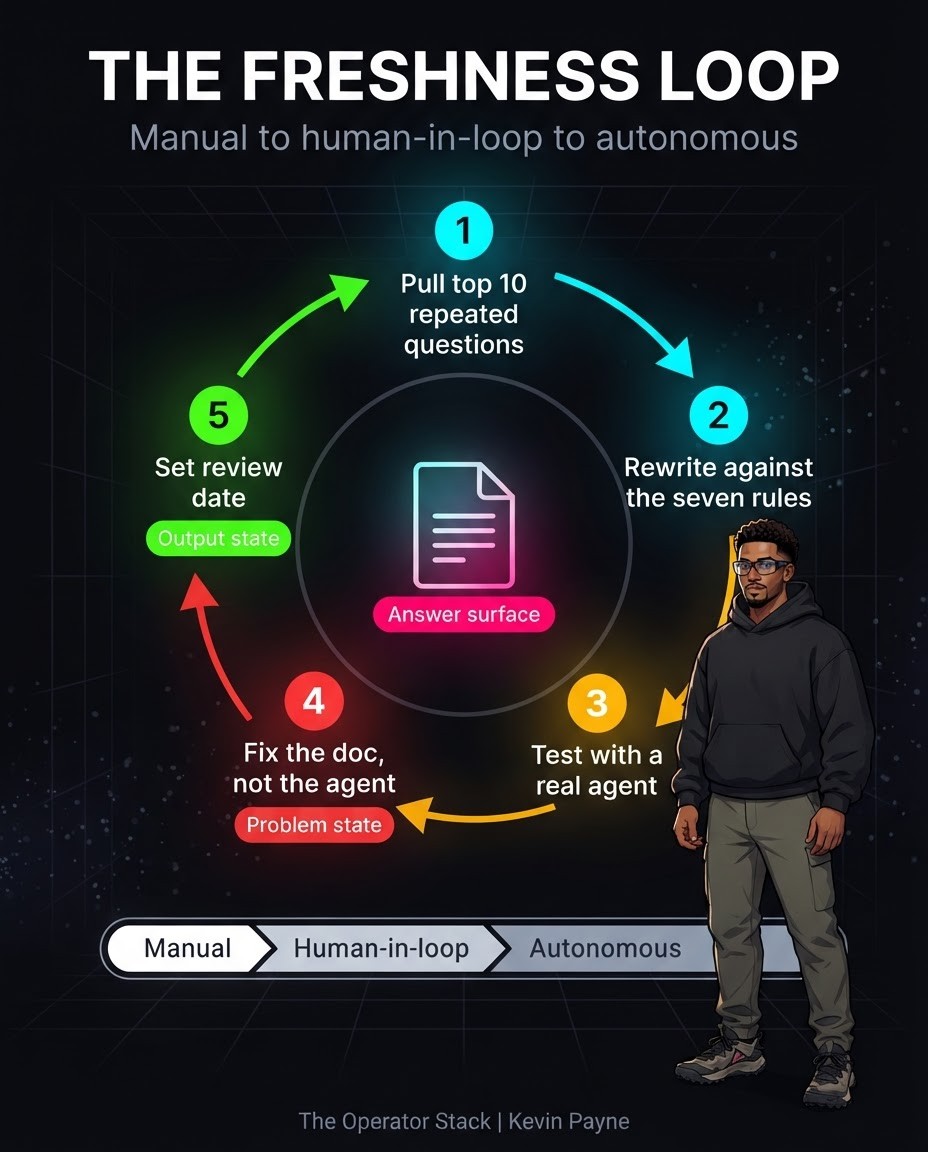
The knowledge base owner runs a simple upkeep cycle: pull the questions people repeat, rewrite the page, test it with a real agent, fix the doc and set a review date.
What should stay with people?
Anything that sends money, changes terms or contacts a customer for the first time keeps a human approval step, whatever level the rest of the workflow reaches. Write these limits on the approval rules page so every agent reads the same list. Most automation tools can enforce them: n8n's human-in-the-loop for tools requires approval before an AI agent runs specific tools, with reviews in Slack, Microsoft Teams, Gmail and other channels. A denied action does not run.
How do you install an AI operating system?
Install it under one workflow, prove it, then add the next workflow to the same layer.
Audit where the manual hours go. List one team's recurring manual tasks, time real runs and cost them per year. The manual-work leak audit walks through the formula, the scoring and the shortlist.
Pick one workflow. Choose the most expensive rule-based workflow that uses tools you already have. Write a one-paragraph brief: trigger, steps, tools, approver and the yearly cost it removes.
Build the shared layer under that workflow only. Create only the pages, tool connections, approval point and log it needs. If your team is adopting Claude for this, the secure Claude rollout guide covers usage policy, access tiers and the security review.
Run it at Copilot level first. The system prepares the output and a named person approves, edits or rejects it. Log every edit; edits show what context is missing.
Promote it when the evidence holds. Promote to Autopilot only after three clean runs in a row with no human edits. The L1 to L4 AI automation maturity ladder sets out the evidence for each level.
What does a sample week-one install plan look like?
Week one builds the shared layer and gets one workflow running at Copilot level. An illustrative plan:
Day 1: Audit. Time three to five recurring tasks on one team and cost them per year. Pick the top workflow.
Day 2: Brief and pages. Write the workflow brief. Create only the knowledge base pages it reads, plus the approval rules page.
Day 3: Connect tools. Connect the two or three apps the workflow touches with the narrowest permissions that work. Record each connection in the admin page.
Day 4: Build and test. Build the agent, point it at the page index and run it on five past examples. Compare its output with what the team actually sent.
Day 5: Go live at Copilot. Turn on the trigger, route every output to the approver and start the run log.
Week two is mostly reading the edit log and fixing pages.
How do you measure whether it is working?
Measure hours and dollars per workflow. Log runs for 30 days after go-live and compare the time against your audit baseline. The difference at your loaded hourly rate is the verified saving.
Here is the worked example from my AI Workflow Install page: a 12-person team spending 8 manual hours per person per week at a $60 loaded rate costs $299,520 a year. In that example one workflow carries half of it, $149,760, and that workflow is where the operating system starts.
Track three numbers:
Hours saved per week, from logged runs.
Edit rate, the share of runs a person had to change.
Exceptions, the runs that stopped and needed a person.
A rising edit rate usually means a page went stale. Before acting on a drop in any number, check it is more than noise; Databox makes the same point, that whether a drop is "a real problem or normal variation" should be answered with statistics "computed the same way every time."
What does an AI operating system cost?
The software is usually the smaller part. Most teams already pay for a knowledge base, chat tool and CRM. The larger cost is setup time, which is why the audit comes first: it points the setup at the workflow with the highest payback.
What are the most common mistakes?
Most failed installs fail on ownership and scope. These are the ones I check for first:
Starting with a tool instead of an audit. The team buys an agent platform, then hunts for something to use it on.
Building five workflows at once. Nothing reaches clean runs, so nothing gets promoted.
One giant context document. Agents get the whole wiki in every prompt, which costs more and answers worse.
Shared admin keys. Every agent uses one person's login, so nobody can tell which workflow did what, and removing access breaks everything at once.
Skipping the log. Without it you cannot prove a saving or find the run that broke.
Promoting after a good demo. Wait for three clean runs in the log.
No owner for the knowledge base. Facts drift, and every workflow drifts with them.
FAQ
Is an AI operating system a single software product?
No. It is a way of connecting the tools you already use. Some vendors sell parts of it, but the setup is specific to your workflows.
How long does it take to install?
The first workflow is the slowest, because it builds the shared layer. Each workflow after that reuses the knowledge base, connections and log.
Do we need engineers to run it?
You need a system owner who keeps the knowledge base current and reviews the logs. That can be an operations or RevOps lead.
Which team should go first?
The team with the most expensive rule-based manual work. Sales, Operations and Product teams usually have the clearest candidates, such as data entry between systems, lead routing and recurring reports.
How is this different from buying an AI agent?
An agent does one task. The operating system lets many agents and automations share context, permissions and oversight.
How big should the knowledge base be at the start?
Only as big as the first workflow needs, usually a handful of pages plus the approval rules. Add pages when the edit log shows a missing fact.
Start with the most expensive workflow
If you want an AI operating system installed for your team, the first step is a free 30-minute Leak Call: we estimate what manual work in one area costs per year, and you get a costed workflow list within 48 hours. You can see all my offers on the services page or contact me directly.
About the author: Kevin Payne is an AI engineer and GTM operator who installs AI workflows for B2B teams. He has 10+ years in B2B SaaS demand generation and RevOps across Techstars, a16z and YC portfolio companies, and his writing has appeared in HubSpot, GetResponse, Outbrain and more.


