How to create a Claude skill: SKILL.md, triggers and testing

Create a folder named after the skill, add a SKILL.md file that opens with YAML frontmatter holding a name and a description, then write the instructions Claude should follow below it. Add scripts or reference files only if the task needs them. Install the folder where your Claude surface reads skills, then test it with prompts.
Skills are where prompting turns into engineering: you stop retyping instructions and ship reusable files. This tutorial is part of AI engineering for GTM operators, and everything in it comes from Anthropic's own documentation as of October 2026.
Key points
A skill is a folder with a SKILL.md file; scripts, references and templates are optional extras.
Claude reads only each skill's name and description at startup, then loads the full file when a task matches.
The description decides whether the skill fires, so write it in the third person and say both what it does and when to use it.
Skills do not sync between Claude apps, Claude Code and the API; you install them on each surface.
Test with at least three realistic scenarios in a fresh session before you trust a skill.
What is a Claude skill?
A skill is a set of instructions Claude loads only when a task needs it. Anthropic's engineering post on equipping agents with Agent Skills puts it plainly: "A skill is a directory containing a SKILL.md file."
The same post describes skills as "organized folders of instructions, scripts, and resources that agents can discover and load dynamically." The Agent Skills overview in the Claude developer docs adds that each skill "packages instructions, metadata, and optional resources (scripts, templates) that Claude uses automatically when relevant."
Skills stay cheap through progressive disclosure. Claude loads them in layers:
Level | What loads | When | Token cost (Anthropic overview) |
|---|---|---|---|
1. Metadata | The name and description from the frontmatter | Always, at startup | About 100 tokens per skill |
2. Instructions | The full SKILL.md body | When the skill is triggered | Under 5,000 tokens |
3. Resources | Reference files, scripts, templates | Only when Claude needs them | None until accessed |
So the metadata must be short and precise, the body carries the procedure, and anything long or rarely needed goes in a separate file. For the theory behind deciding what Claude sees and when, the guide to context engineering covers it.
A saved prompt helps once. A skill packages the instructions, checks and resources so the work compounds every time it runs.

What goes in a SKILL.md file?
Two parts: YAML frontmatter fenced by two lines of three dashes, then Markdown instructions. Everything else in the folder is optional.
The open Agent Skills specification lays out the standard folder:
SKILL.md. Required. Metadata plus instructions.
scripts/. Optional executable code, commonly Python, Bash or JavaScript.
references/. Optional documentation Claude reads on demand, such as a REFERENCE.md.
assets/. Optional templates, images and data files like lookup tables.
The frontmatter fields
Field | Required? | Rules from the docs |
|---|---|---|
name | Yes | Max 64 characters; lowercase letters, numbers and hyphens only. The Anthropic overview bars the words "anthropic" and "claude". The spec says it must match the folder name. |
description | Yes | Non-empty. Max 1,024 characters per the Anthropic overview and the spec. Must say what the skill does and when to use it. |
allowed-tools | No | Marked experimental in the spec. In Claude Code it pre-approves specific tools while the skill runs. |
Here is an illustrative SKILL.md for a revenue team, written to the format above:
The spec suggests step-by-step instructions, input and output examples, and edge cases for the body. Both Anthropic's skill authoring best practices and the spec say to keep the SKILL.md body under 500 lines and move detail into referenced files one level deep.
Scripts and resources
The engineering post says skills "can also include code for Claude to execute as tools at its discretion," and that "it should be clear whether Claude should run scripts directly or read them into context as reference." Per the overview, only a script's output enters context.
Where do Claude skills run?
Skills work in the Claude apps, Claude Code and the Claude API, but each surface installs and shares them differently. The overview states that custom skills do not sync across surfaces.
Surface | How you install a custom skill | Who can use it | Network access (Anthropic overview) |
|---|---|---|---|
Claude apps (claude.ai) | Upload a ZIP of the skill folder, then enable it | Individual to each user | Full, partial or none, depending on user and admin settings |
Claude Code | Save the folder in ~/.claude/skills/ (personal) or .claude/skills/ (project), or ship it in a plugin | You, your repo's collaborators, or anyone with the plugin | Same as any program on your computer |
Claude API | Upload the skill, then pass its skill_id in the container parameter with the code execution tool | Shared workspace-wide | None; only pre-installed packages |
Three details change how you build:
Plans. The overview lists custom skill uploads on Pro, Max, Team and Enterprise with code execution on. The Claude Help Center article on creating custom skills says skills are available on Free, Pro, Max, Team and Enterprise.
ZIP layout. The Help Center says the folder name must match the skill name and the ZIP should contain the skill folder at its root.
Claude Code scope. The Claude Code skills docs say a personal skill loads in "all your projects on this machine, but not Cowork or cloud sessions," while a project skill should be committed "so your team gets it too."
Rolling skills out to a team? Pair this with the guide on how to roll out Claude to a team securely.
How do you write a description that triggers?
Say what the skill does and when to use it, in the third person, with the words users actually type. It is the only part Claude sees before deciding to load the skill.
The engineering post explains that at startup the agent "pre-loads the name and description of every installed skill into its system prompt." The best practices page gives the rules that follow from that:
Write in the third person. "The description is injected into the system prompt, and inconsistent point-of-view can cause discovery problems."
Name what and when. "Include both what the Skill does and specific triggers/contexts for when to use it."
Use real keywords. The spec's good example names PDFs, forms and document extraction; its poor example is "Helps with PDFs."
Name it as an activity. The best practices page suggests gerund names such as processing-pdfs or analyzing-spreadsheets.
Watch the length limits, because the sources differ. The Anthropic overview and the open spec allow 1,024 characters. The Help Center article lists a 200 character maximum for skills uploaded to Claude apps. Claude Code truncates the combined description and when_to_use text at 1,536 characters in its listing, and its docs advise: "Put the key use case first." Writing to 200 characters is the safe choice for a skill used everywhere.
A quick before and after, both illustrative:
Weak | Strong |
|---|---|
Helps with sales calls. | Summarizes B2B discovery call transcripts into a CRM note with pain, budget, timeline and next step. Use when the user pastes a call transcript or asks for call notes. |
How do you build your first skill step by step?
Start from a task Claude gets wrong without help, write the smallest skill that fixes it, then grow it.
Pick one repeated task. A process you already documented is the best source; the guide on turning an SOP into an AI workflow shows how to break one down.
Run it without a skill first. The best practices page calls this identifying gaps: run Claude on representative tasks and "document specific failures or missing context."
Create the folder. Use a lowercase hyphenated name. In Claude Code that is a path like ~/.claude/skills/summarizing-discovery-calls/SKILL.md. Anthropic's public skills repository on GitHub includes a template skill to copy.
Write the frontmatter and minimal instructions. Cover only the gaps you found, plus one example of good output.
Move detail out. Templates go in assets/ or references/; repeatable calculations go in scripts/.
Install, test and iterate. See the next section.
The engineering post also recommends building the skill with Claude: ask it to capture "its successful approaches and common mistakes into reusable context and code within a skill." When I build skills, most start that way, from a session that finally worked.
This is the operator side of my work. I build skills and workflows like these for my own systems, and I do the same for SaaS revenue teams (lead routing, CRM cleanup, pipeline reporting) in a 90-day AI RevOps Sprint for Series A and B SaaS. Contact me to get yours scoped.
How do you test a skill before you rely on it?
Write three or more test scenarios, measure Claude without the skill, then with it in a fresh session. Fix the description if it does not fire and the body if the output is wrong.
The best practices page lays out evaluation-driven development in five steps: identify gaps, create three scenarios that test them, establish a baseline without the skill, write minimal instructions, then iterate. It also says to test "with Haiku, Sonnet, and Opus."
Checks from the docs:
Use a fresh session. The Claude Code docs warn that "leftover context from authoring the skill will mask gaps in the written instructions."
Check that it loads. The Help Center suggests trying several prompts that should trigger the skill and checking Claude's thinking to confirm it loaded.
Call it directly. In Claude Code, /skill-name runs the skill, separating a trigger problem from an instruction problem.
Anthropic also ships a skill-creator tool for this. Its skill-creator update post from March 2026 says it can "write evals, run benchmarks, and keep your skills working as models evolve," and reports "improved triggering on 5 out of 6 public skills" when run across Anthropic's document-creation skills. For a wider method for testing business workflows, read the guide on evals for business AI workflows.
When a skill does not fire
Claude Code's troubleshooting section lists the usual fixes:
The description includes keywords users would naturally say
The skill appears when you ask "What skills are available?"
The opening dash line is the very first line of the file, or Claude Code ignores the frontmatter
The YAML parses; malformed YAML loads the body with empty metadata
If it fires too often, the description is narrower, or disable-model-invocation is set to true
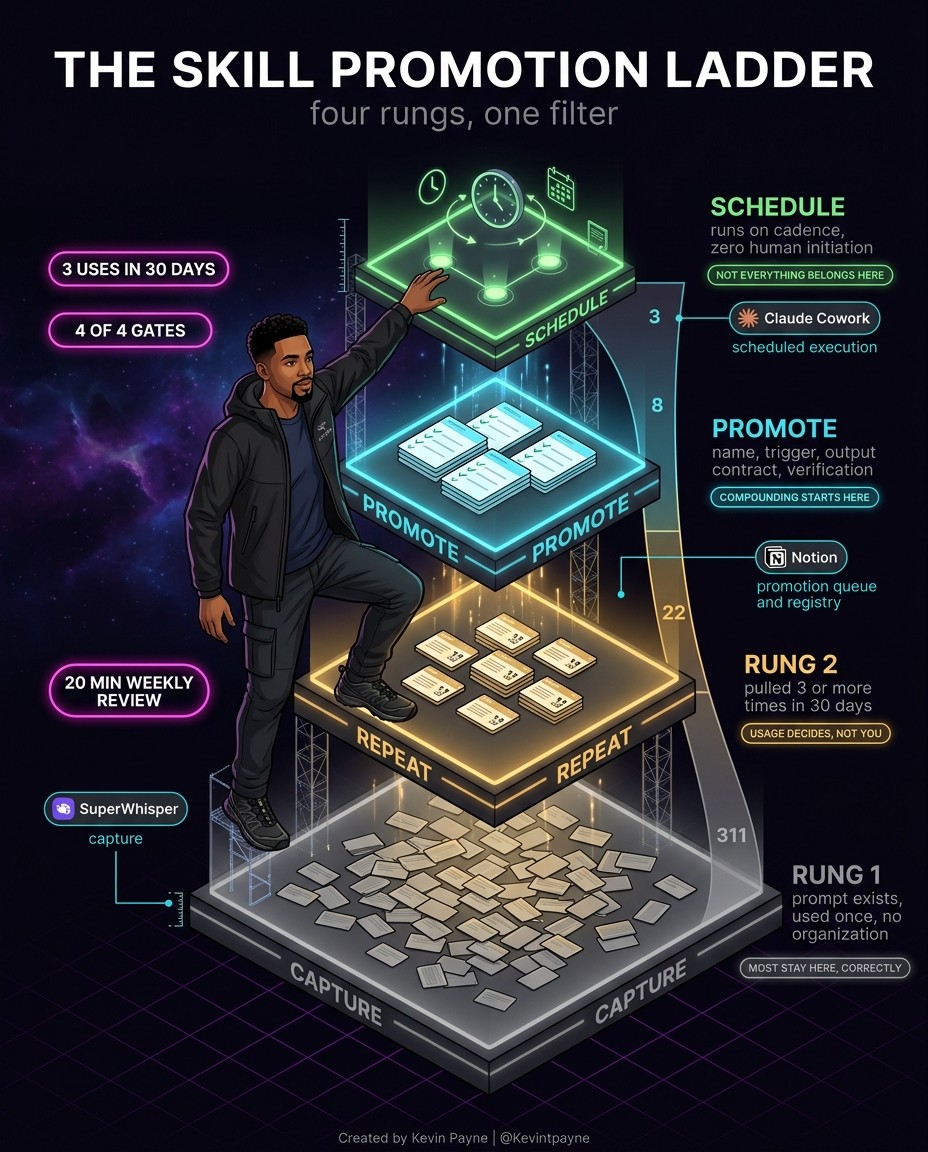
A simple rule for which prompts earn a skill: capture the task, repeat it, and promote it once it has proven itself in real use.
What are the common mistakes?
Most failed skills fail at the description or the scope. Anthropic's docs warn against these patterns.
A vague description. "Helps with PDFs" gives Claude nothing to match on.
One giant file. A SKILL.md over 500 lines costs context every time it fires. Split it.
Deep reference chains. Keep references one level deep from SKILL.md so Claude reads complete files.
Too many options. The best practices page says: "Don't present multiple approaches unless necessary."
Windows-style paths. Use forward slashes, such as scripts/helper.py.
Assuming it syncs. A skill in Claude Code is not in claude.ai or the API until you install it there.
Assuming network access. API skills cannot call external services or install packages at runtime.
Installing untrusted skills. The overview says to use skills "only from trusted sources" and to "review all files bundled in the Skill." A malicious skill can direct Claude to call tools or run code against its stated purpose.
Treat a shared skill like software, with a review and an owner. If your skills pull data from tools such as a company wiki, the guide on how to connect Claude to Notion over MCP covers that side.
FAQ
What file does a Claude skill need?
Only a SKILL.md file inside a folder, with frontmatter holding a name and a description.
How long can a skill description be?
The Anthropic overview and the open Agent Skills spec allow 1,024 characters. The Claude Help Center lists 200 characters for skills uploaded to Claude apps, so shorter is safer.
Can I use the same skill in claude.ai, Claude Code and the API?
Yes, but you install it separately on each. Anthropic's overview says custom skills do not sync across surfaces.
Do Claude skills need code?
No. Many are instructions only. Add scripts when a step must run the same way every time.
Why is Claude not using my skill?
Usually the description lacks the words people type, or the frontmatter did not parse. Rewrite it with real trigger phrases and retest.
Are skills from the internet safe to install?
Anthropic recommends skills you wrote or got from Anthropic, and auditing every bundled file first.
Want help building skills for your team?
If you are turning your team's playbooks into skills and want a second pair of hands on structure, triggers or testing, see how I work. Or book a short intro call and bring the one process you would turn into a skill first.
Running revenue at a Series A or B SaaS company? Ask about the 90-day AI RevOps Sprint. I take two clients at a time.
About the author: Kevin Payne is an AI engineer and GTM operator who installs AI workflows for B2B teams. He has 10+ years in B2B SaaS demand generation and RevOps across Techstars, a16z and YC portfolio companies, and his writing has appeared in HubSpot, GetResponse, Outbrain and more.


