What is context engineering? Prompt, context, loop and graph engineering explained

Context engineering is the practice of deciding everything an AI model sees before it responds: the instructions, the documents, the tool definitions, the examples and the conversation so far. A prompt is one input. Context engineering designs the whole input, so the model has what it needs for the task and nothing that distracts it.
It is one of four layers I use to teach AI engineering to operators: prompt, context, loop and graph. This page defines each one. The full learning path, from first prompt to self-improving workflow, sits in the guide to AI engineering for GTM operators.
Key points
Prompt engineering shapes one instruction. Context engineering shapes everything in the model's window at the moment it runs.
Anthropic's engineering team calls context engineering "the natural progression of prompt engineering," and LangChain's Harrison Chase calls prompt engineering "a subset of context engineering."
Loop engineering adds checks and fixes between runs. Graph engineering maps the steps, branches and shared state of a multi-step workflow.
LangChain's Chase argues that as models improve, more agent failures trace back to poor context than to the model: missing data, stale documents or too much noise.
You can practice context engineering today with tools you already use, such as Claude, Notion and an MCP connector.
Where did the term context engineering come from?
The term spread in June 2025, when several well-known builders said it described the work better than "prompt engineering." Simon Willison collected the key posts in his note on context engineering.
Two of the posts he quotes:
Tobi Lutke, CEO of Shopify. He described context engineering as "the art of providing all the context for the task to be plausibly solvable by the LLM."
Andrej Karpathy. He called it "the delicate art and science of filling the context window with just the right information for the next step."
Two companies then wrote longer definitions. Harrison Chase of LangChain, in the rise of context engineering (June 23, 2025), defines it as "building dynamic systems to provide the right information and tools in the right format" so that "the LLM can plausibly accomplish the task."
Anthropic's Applied AI team followed in effective context engineering for AI agents (September 29, 2025). It describes context engineering as "the set of strategies for curating and maintaining the optimal set of tokens" during a model run.
How is context engineering different from prompt engineering?
Prompt engineering improves the words in one instruction. Context engineering improves the full set of inputs the model receives, of which the prompt is only one part.
Zapier's explainer on prompt engineering, by Sarah P. Grant, defines it as "the process of carefully crafting prompts (instructions) with precise verbs and vocabulary" to get better outputs.
Chase's argument is that when an agent fails, the usual cause is that "the appropriate context, instructions and tools have not been communicated to the model." He calls prompt engineering "a subset of context engineering." Anthropic frames the shift the same way, as "the natural progression of prompt engineering."
A practical way to tell them apart:
Question | Prompt engineering | Context engineering |
|---|---|---|
What you change | The wording of the instruction | Every input in the window: instructions, data, tools, history |
Unit of work | One message | One model run inside a workflow |
Typical fix | Rewrite the ask, add an example | Add a missing document, remove noise, define a tool, summarize history |
Where it lives | A chat box or a prompt template | System prompts, skills, knowledge bases, connectors |
Fails when | The ask is vague | The model lacks facts, has stale facts or drowns in irrelevant ones |
What goes into an AI model's context?
Context is every token the model can read when it generates a response. Anthropic's post lists the main components as "system prompts, tools, examples, message history, etc."
For a GTM workflow, that breaks down like this:
System prompt. The standing instructions: role, rules, tone, output format. For a prospect research agent, that might be "Write a five-line account brief. Cite every fact."
Retrieved documents. The ICP definition, the product one-pager, the last call notes, pulled in for this run only.
Tool definitions. What the model can call, such as a CRM lookup or a web search, with a clear description of when to use each.
Examples. Two or three finished briefs that show the target format.
Message history. The earlier turns of the run, including tool results.
Memory or notes. Facts saved from earlier runs that the model reads back in.
Why less context is often better
More is not better. Anthropic's post warns that context "must be treated as a finite resource with diminishing marginal returns" and describes "context rot": as tokens in the window increase, the model's ability to recall information from that context decreases.
Its guiding principle is that good context engineering means "finding the smallest possible set of high-signal tokens that maximize the likelihood of some desired outcome." In practice, that means cutting the 40-page playbook down to the two pages this task needs.
Before you connect a tool or data source to the model, run a short audit of what it exposes, what it consumes and who controls access.

What are prompt, context, loop and graph engineering?
They are four layers of the same job, from one instruction to a full system. Each layer contains the one before it.
Prompt engineering
The instruction itself: what you ask, how you phrase it, which examples you show. It is the right layer for one-off tasks in a chat window.
Context engineering
Everything the model sees on one run. It is the right layer once a task repeats and depends on company data, such as a weekly pipeline summary that needs current CRM fields.
Loop engineering
Loop engineering is the term I use for designing a workflow that checks and improves itself between runs. Each run is scored against pass/fail rules, the result is logged, and failures are fed back into the prompt, the context or the data. The full method is in the guide to loop engineering for AI workflows.
Anthropic's post on building effective agents describes a related pattern, the evaluator-optimizer, where "one LLM call generates a response while another provides evaluation and feedback in a loop."
Graph engineering
Graph engineering is my label for designing a multi-step workflow as a map of steps and decisions. LangChain's LangGraph Graph API docs define the three parts: state, "a shared data structure that represents the current snapshot of your application"; nodes, "functions that encode the logic of your agents"; and edges, which decide which node runs next. The docs sum it up as "nodes do the work, edges tell what to do next."
You do not need LangGraph for this. An n8n flow or an SOP with branches is also a graph.
The four layers side by side
Layer | Question it answers | Scope | Example in a GTM workflow |
|---|---|---|---|
Prompt | How do I ask? | One instruction | "Summarize this call in five bullets" |
Context | What does the model see? | One model run | The call transcript, the account's CRM record and the deal stage rules |
Loop | How does it get better? | Many runs over time | Every summary checked for a next step and owner; misses logged and fixed weekly |
Graph | What happens in what order? | The whole workflow | Transcript in, summary, CRM update, Slack alert if the deal is at risk |
How do the four layers work together in one workflow?
Each layer fixes a different kind of failure.
An illustrative inbound lead routing workflow, with round hypothetical numbers:
Graph. A form fill triggers enrichment, then a fit score, then a branch: high fit goes to an account executive, mid fit to a nurture sequence, low fit to a log.
Context. The scoring step sees the ICP definition, the enrichment fields and three scored examples. It does not see the full product wiki.
Prompt. The scoring instruction asks for a score from 1 to 10 and a one-line reason, in a fixed format the next step can parse.
Loop. Each week, a reviewer checks 20 routed leads against the rules. If 3 were misrouted because the ICP doc was out of date, the fix goes to the doc, not the prompt.
That last step is where most of the gains come from. Before trusting the output, you need a test set and pass/fail checks, which the guide to evals for business AI workflows walks through.
I build these layers into my own workflows, and I do the same for SaaS revenue teams (lead routing, CRM cleanup, pipeline reporting) in a 90-day AI RevOps Sprint for Series A and B SaaS. Contact me to get yours scoped.
What techniques do context engineers use?
Most techniques come down to two moves: load less up front, and load the right thing at the moment it is needed. Anthropic's post names several.
Just-in-time retrieval. Instead of pasting every file into the prompt, agents "maintain lightweight identifiers" such as file paths or links and fetch the content only when a step needs it.
Compaction. When a conversation nears the window limit, the agent summarizes it and starts fresh with the summary.
Structured note-taking. The agent "regularly writes notes persisted to memory outside of the context window," then reads them back later.
Sub-agents. Focused helpers handle one task each "with clean context windows" and return a short result to the main agent.
Skills and connectors
Two building blocks make these techniques practical for operators.
Anthropic's post on Agent Skills (October 16, 2025) describes skills as "organized folders of instructions, scripts, and resources." At startup, the agent loads only "the name and description of every installed skill," and reads the full SKILL.md only when the task calls for it. That is context engineering built into the format. The step-by-step version is in the guide on how to create a Claude skill.
The Model Context Protocol site describes MCP as "an open-source standard for connecting AI applications to external systems," and compares it to a USB-C port for AI applications. A connector lets the model pull the right Notion page or CRM record at run time instead of relying on a stale copy. The setup is covered in the guide to connecting Claude to Notion with MCP.
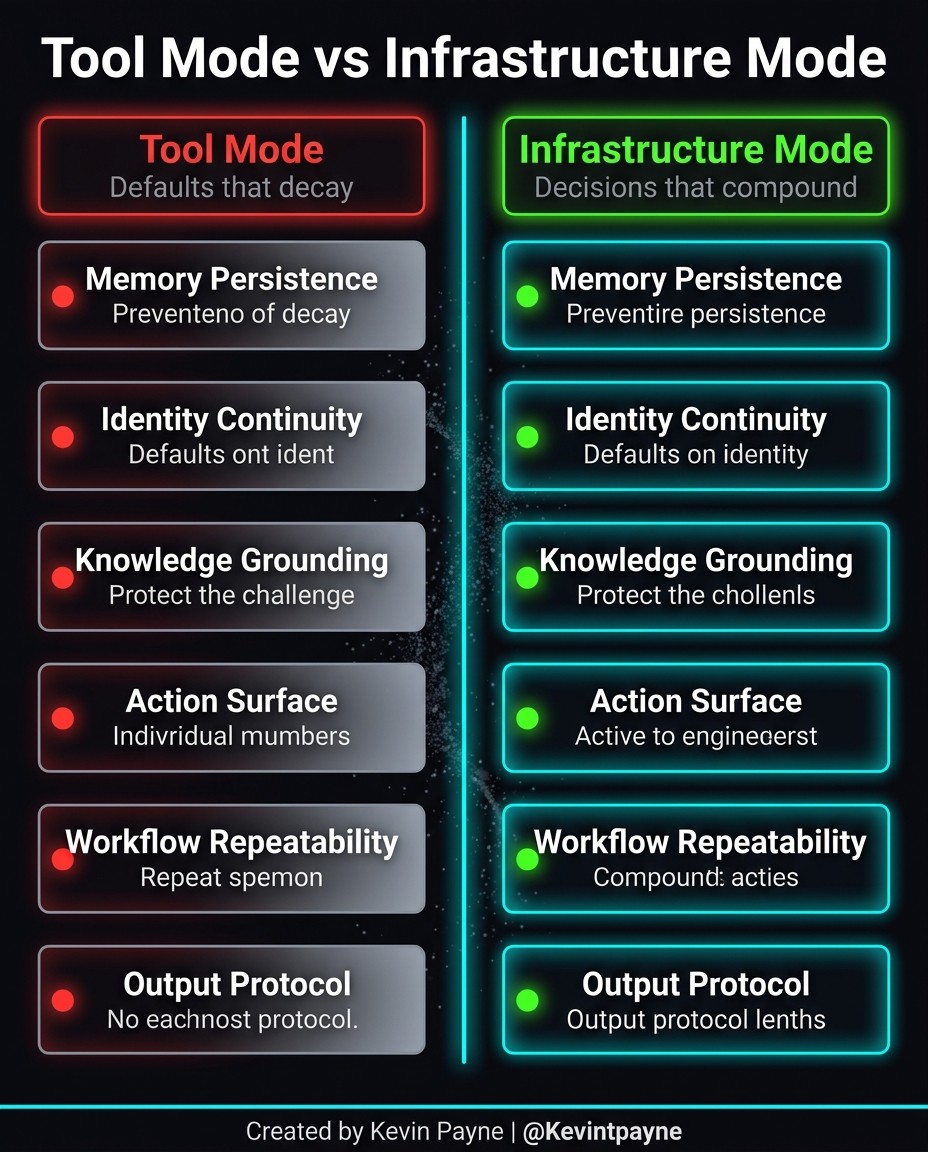
A quick test of whether your setup is a tool or infrastructure: check memory, identity, knowledge grounding, actions, repeatability and output format.
How do you start practicing context engineering?
Start with one repeating task you already do with AI, then audit what the model sees on each run.
Pick one recurring task. A weekly pipeline summary, a call recap or an account brief. One-off chats do not need this.
List every input. Write down the instructions, files, fields and examples the model receives today.
Mark each input as needed, noise or missing. Cut the noise. Add what a new hire would need to do the task well.
Move standing rules into a skill or system prompt. The rules stop living in your head or a pasted note.
Connect live data. Replace pasted exports with a connector so the model reads current records.
Write five pass/fail checks. For a call recap: has a next step, has an owner, cites the call date, under 150 words, no invented numbers.
Run it ten times and log the misses. Each miss points to a missing, stale or noisy input.
If the task already lives in a process document, the guide to turning an SOP into an AI workflow shows how to map it into steps first. The tools I build on are listed on my stack page.
What are the common mistakes?
The most common mistake is fixing context problems with prompt edits. If the model lacks a fact, no rewording supplies it.
Pasting everything. A full wiki in the window adds noise and, per Anthropic's context rot warning, lowers recall.
Stale context. A pricing sheet from last quarter produces confident, wrong answers. Connect the source or date-stamp it.
Vague tool descriptions. If two tools look alike, the model guesses. Each needs one clear job and a note on when to use it.
No examples of the output. Two finished examples often beat a paragraph of format rules.
Skipping the loop. Without logged checks, nobody knows whether last week's fix helped.
Building the graph first. A ten-step flow built on weak context fails at step two. Get one step reliable, then add branches.
FAQ
What is context engineering in simple terms?
Choosing what an AI model sees before it answers: the instructions, data, tools, examples and history, with as little noise as possible.
Is context engineering replacing prompt engineering?
No. Prompt engineering is part of it. LangChain's Harrison Chase calls prompt engineering "a subset of context engineering," and Anthropic calls context engineering its "natural progression."
Who coined the term context engineering?
No single person is credited. Tobi Lutke and Andrej Karpathy both endorsed it publicly in June 2025, as Simon Willison documented.
What is the difference between loop engineering and context engineering?
Context engineering shapes what the model sees on one run. Loop engineering checks results across many runs and feeds the fixes back into the prompt, context or data.
What is graph engineering?
Designing a multi-step workflow as a map of steps (nodes), routing decisions (edges) and shared state, the model LangGraph uses.
Do I need to code to do context engineering?
No. Writing a clear skill, cleaning up a Notion knowledge base and connecting it through MCP are all context engineering, and none require code.
Want help building your first context-engineered workflow?
If you would rather have a second pair of hands on the build, see how I work or book a short intro call and we can look at the one workflow worth fixing first.
Running revenue at a Series A or B SaaS company? Ask about the 90-day AI RevOps Sprint. I take two clients at a time.
About the author: Kevin Payne is an AI engineer and GTM operator who installs AI workflows for B2B teams. He has 10+ years in B2B SaaS demand generation and RevOps across Techstars, a16z and YC portfolio companies, and his writing has appeared in HubSpot, GetResponse, Outbrain and more.


